Device Fingerprinting
Device Fingerprinting (DFP) is a method of fraud protection and able to identify technical devices in an anonymized way.
Fraudsters learn to exploit the weaknesses of traditional fraud prevention tools over time. We protect businesses from fraud and loss of revenue with that solution for innovative fraud prevention. By automatically linking transactions, fraud can be detected in real time. And with our self-learning and adaptive software you will be prepared to face new and upcoming fraud scenarios.
On this page we describe the procedure of DFP and how to implement its result in the PAYMENT_REQUEST / Authorization request.
Parameters
When implementing the DFP technology, you need to handle 2 parameters:
| Parameter | Variable Name for Script | Value |
|---|---|---|
| snippetId | v |
Test environment: C9rKgOt Live environment: Provided by Ratepay , please ask your Ratepay representative |
| token | t |
Generated by you. See Generate a Unique Token |
Implementation Options
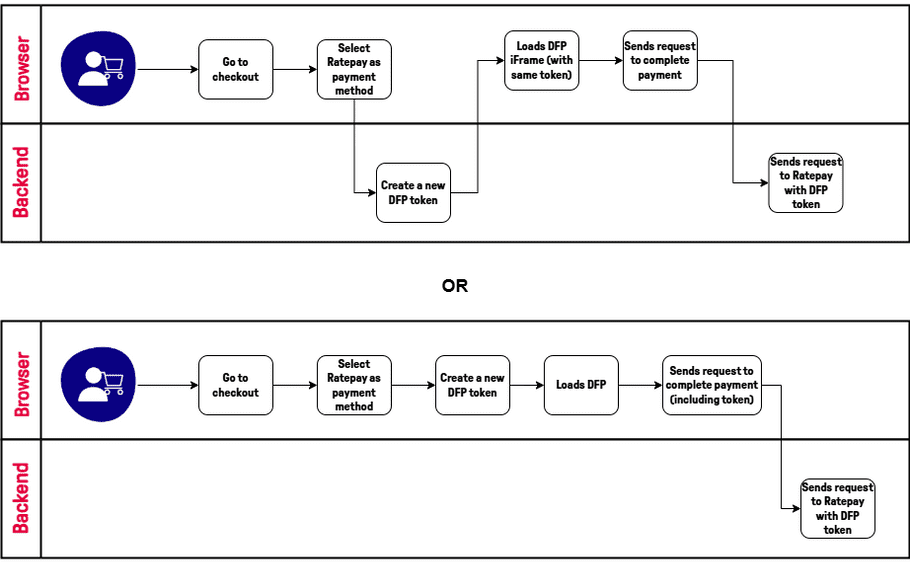
Once the user selects payment with Ratepay, make sure that the script below gets rendered as quick as possible, and also that the request to Ratepay will contain that same token.
1. Generate a Unique Token
To generate a DFP you first need to create a unique token within your web shop. Ratepay recommends using a UUID v4.
Please notice: the token itself can be generated in either the backend of your web shop or in the frontend. All that matters is that the frontend uses the same that's sent on the request to Ratepay.
warning
If not using a UUID use these characters only
A-Z a-z 0-9 - _
Examples
import { v4 as uuidv4 } from 'uuid';
const token = uuidv4(); // '1b9d6bcd-bbfd-4b2d-9b5d-ab8dfbbd4bed'let token = crypto.randomUUID(); // '1b9d6bcd-bbfd-4b2d-9b5d-ab8dfbbd4bed'use Ramsey\Uuid\Uuid;
$token = Uuid::uuid4();2. Include Script Into Web Page
Output the DFP JavaScript code on payment selection page, when the shopper chooses a Ratepay payment method, but as early as possible to get a sufficient latency, 4-5 seconds, between script call and end of the checkout process.
If the script is executed at the same time as the shopper clicks “Buy now” , it could be possible that Ratepay is not enabled to access the Device fingerprint data fast enough to use them during Ratepay’s risk check.
warning
Please ensure that this script is executed only once per session (per buyer + checkout + device).
attention
Please do not implement this on your own. Use the provided code below.
Replace the token and snippetId placeholder with the respective values.
<script language="JavaScript">
    var di = document.createElement("script");
    di.setAttribute('language', 'JavaScript');
    di.innerHTML = "var di = {t:{{token}}, v:{{snippetId}}, l:'Checkout'};"
    document.getElementsByTagName("body")[0].appendChild(di);

    var script = document.createElement("script");
    script.type = "text/javascript";
    script.src = "https://d.ratepay.com/{{snippetId}}/di.js";
    document.getElementsByTagName("body")[0].appendChild(script);
</script>
<noscript><link rel="stylesheet" type="text/css" href="https://d.ratepay.com/di.css?t=${{token}}&v=${{snippetId}}&l=Checkout"></noscript><script language="JavaScript">
var di = {
t:'<?php echo $token ?>',
v:'<?php echo $snippetId ?>',
l:'Checkout'};
</script>
<script type="text/javascript" src="https://d.ratepay.com/<?php echo $snippetId ?>/di.js"></script>
<noscript>
<link rel="stylesheet" type="text/css" href="https://d.ratepay.com/di.css?t=<?php echo $token ?>&v=<?php echo $snippetId ?>&l=Checkout">
</noscript>3. Use Token in Authorization Request
warning
We as Ratepay can only access and link the device data to the corresponding transaction, when we get the generated DFP token within the authorization call/Payment Request.
Payment API 1.8
Transfer the DFP token in the head within the field <device-token> in the PAYMENT_REQUEST to Ratepay.
Payment API 2.0
Transfer the DFP token within the field device.token in the Authorization request to Ratepay.